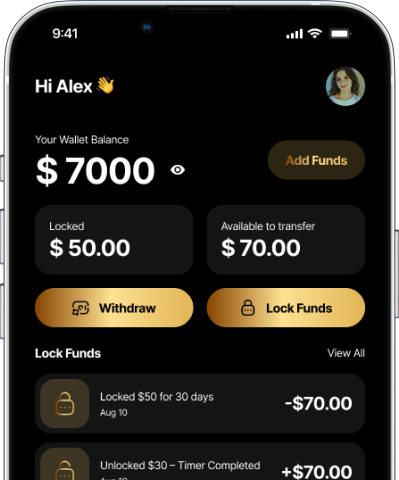
About The App
ABOUT TIMEVAULT APP
TimeVault is a smart financial discipline app built for anyone who struggles with impulse spending and wants an easy way to build savings. The concept is simple: you deposit money, choose a time period, and lock it. Until that time ends, the funds stay securely unavailable – helping you stick to your saving goals without stress.
We’re not a bank and we don’t control how you spend; we simply give you a tool that helps you pause, lock, and grow financially responsible habits. TimeVault uses behavioral psychology, time-locking technology, and clean design to turn overspending habits into savings habits for everyone.
No complicated investing. No distractions. No hidden conditions.
Just intentional saving – made effortless.
Our mission is to empower Gen Z, students, young professionals, and anyone who wants structure in their finances through a simple, commitment-based system. Whether you’re saving for rent, a bill, a gift, or future goals, TimeVault makes staying disciplined easy.
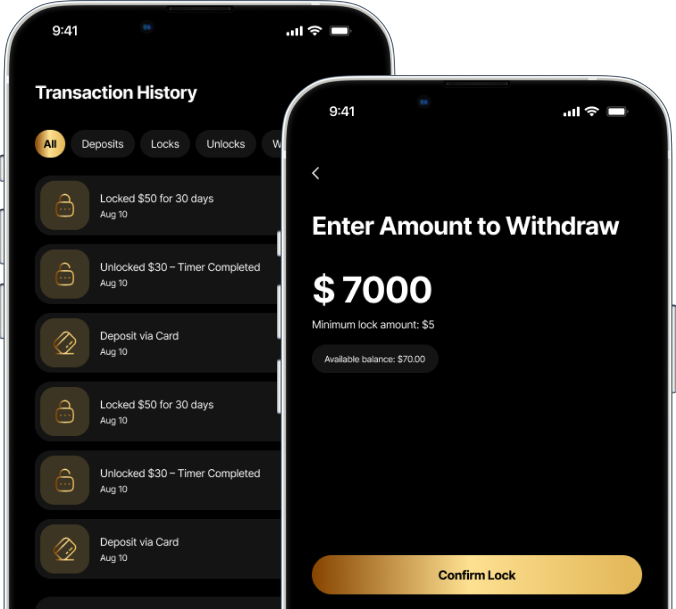
- Features
Core Features

Smart Wallet Locking System
Lock funds safely with a timer

Card Linking & Payouts
Secure transfers through Stripe/Plaid

Monetization & Rewards
Earn incentives via ad integrations

Transaction Timeline
Track your savings journey visually

Fund Security & Trust
Transparent protection
- FAQ's
Frequently Asked Questions
1- Your TimeVault
No. Money placed in a TimeVault remains locked until the timer reaches its scheduled end time.
Your timer cannot be changed once your Lock has been created.
A Lock cannot be canceled once it has been started. Your money will remain locked until the scheduled end time.
Once your timer reaches its end time, your Lock is complete and your money becomes available according to the app's applicable process.
Nothing changes. Your Lock continues running even when you aren't using the app.
Yes. Your Lock continues running based on its scheduled end time.
Yes. You can use different Locks for different savings goals, such as rent, a vacation, textbooks, or a night out.
2- Notifications
You can manage TimeVault notifications through your phone's notification settings. On some devices, you may also be able to manage notification preferences within the app.
If notifications are enabled, TimeVault can notify you when your Lock reaches its scheduled end time.
Make sure notifications are enabled for TimeVault in your phone's settings and that you have an active internet connection.
3- Account & Settings
Go to your account or profile settings and follow the instructions to update your email address.
Go to your account settings and select the option to change or reset your password.
Yes. Download TimeVault on your new device and log in using your existing account information.
Go to your account or profile settings and select Log Out.
Go to your account settings and select the account deletion option. Please review any information presented before confirming deletion.
4- Troubleshooting
Make sure you have an internet connection and that you're using the latest version of TimeVault. If the issue continues, close and reopen the app.
First, make sure you're using the latest version of TimeVault. Try closing and reopening the app.
Make sure you're using the correct login information. If you've forgotten your password, use the password reset option.
If you still need help, feel free to reach out directly to the app administrator via email, at admin@timevaultapp.co
5- Security & Privacy
TimeVault uses security measures designed to help protect your account and information. You should also keep your login information private and never share your password with anyone.
TimeVault takes steps to protect your personal information and uses security measures designed to safeguard your account and data.
Join the Waitlist
Be the first to experience a smarter way to save — join the waitlist today.